


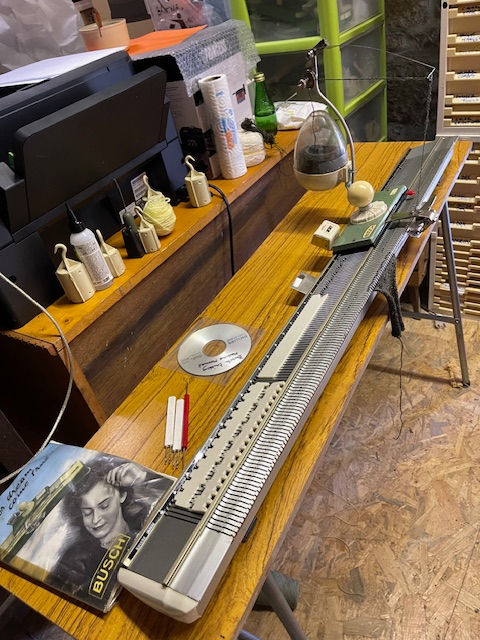


Singer 9000 with Superbaknit install

Updated: Dec 1, 2025

Once I had paid the package arrived fairly quickly and the IBB Group in Europe company offered a discount of 100 euros – price of the package was now 290 euros, this was the reason I considered it. The original Superba 9000 Electronic Knitting |Machine is a fantastic machine but like the Brother 970 it was a huge hassle to set up. Strangely enough both these machines have inbuilt knitwear programmes so I wonder if that is what makes them so much work to simply knit a stitch pattern. The Brother 970 software is also available from this company but to be honest I have the best Brother of them all the 940 and Designaknit so seriously it was not worth the more expensive upgrade whereas the 9000 has the benefit of being a double bed and more importantly I love the fact that it also has a bed space facility which means it handles thicker yarn on its 5 mm spacing. I had a light double knit and used a fairisle pattern and the machine handled this yarn easily. Perhaps I should say that you will no longer be able to use the inbuilt patterns for garments that were included in the original format of the Superba 9000 - these form computer type programs do come in handy when in comes to unusual yarns, however there is a Superba form computer that comes as a separate accessory that can be used instead.

First things first though, the board was a bit flimsy and really there was not much to hold it on except a couple of plastic ties. The other board offered for the light scanning machines was very much more robust with what looks like a more secure setup.
I managed to remove the old board and cut the wire highlighted and join it, very easy, and reconnect it to the new board. I then read the instructions to set the cursor, and these were very confusing, the pictures were pretty rubbish and the terminology a bit over the top. I mean what is a potentiometer I ask you, I for the life of me could not understand where or how to adjust the required I think screws so I just looked for 2 holes in the board and tried that, only hope I picked the right 2 holes to use my tiny screwdriver in. Somehow I managed to set the cursor and then I thought I will try it now. So I installed the software, including a pattern and following the instructions I eventually chose knit, then knit again on the following screen. I had already cast on for a simple fairisle pattern on the back bed only and set the cursor. Unfortunately nothing happened – it did not select the needles, hence back to the drawing board.

I searched the web for a youtube video thinking I had not set the cursor correctly, I then removed the board, and well to cut a long story short, I discovered that the connecter had slipped off, hence no patterning. I have to admit that the connection fell off and given the lack of fixings of the board to the machine, I was not surprised. However, onward and upward. My machines unfortunately get moved around a lot so I may have to look at that in the future.
Once put together again. I re-sent everything through and it worked fine. Seriously its about time the company offered just a wee video on the hardware installation, it would be so much easier and preferably on both systems. It would take someone no longer than a hour or two – I dunno, great wee piece of hardware and no bad software but the hardware installation instructions came out of the ark. I never did use the plastic ties to hold it to the bed, I did try but the cover would not close and I aint drilling no holes in my machine as suggested. I wonder why they did not use the plastic holder on the original board to seat it in the 9000, it would have been so much more secure.

Now for the good bit, the software (Pattern Explorer) that Superbaknit includes, its not too bad at all when you get used to it. There are a ton of great stitch patterns on offer – however no way could I open the damn thing via the usual route (ie right click and open with) so I just highlighted, and right clicked the pattern I fancied and dragged it into the Superbaknit line that requests the pattern info, but take note, it does not slip into the actual picture box, must admit it threw me initially! Once you get the pattern in there, then you can have a quick look to see if its what you want. There are loads of options once you press the button to download it. One thing I love about the 9000 stitch pattern book are the pintuck patterns and I thought I would give them a go, after casting on over 50 stitches in full needle rib using a fine yarn, I set the the pattern up by opening the pattern explorer and using my 9000 stitch pattern manual looked up the pintuck pattern I wanted to knit and slid it over to the superbaknit software. Took a couple of seconds, I then downloaded the pattern and simply used the format in the window, but added double carriage and my width then checked the box, not much point in looking at the pattern as it bears no resemblance to a pintuck, I then checked the knit box again and it was so easy, after setting the carriages as per the instruction manual. To my mind the 9000 instruction manual is necessary for some of the fancier stitches as it informs you of the settings. I assume the creators expected machine owners to have the original manuals anyway.
The Superbaknit box must be connected to the computer and hence the machine before you can open the software and then you should set the cursor at this point and then downloaded the pattern, you can then take a quick look at what you have downloaded – and this opens up all sorts of options including a preview of how the pattern will look. If you are happy with this, you can then press knit and it downloads the pattern to the machine and takes you back to the first screen where you just press knit – you then get to see the pattern and whilst knitting it moves up row by row. Of course you can just press knit from the initial screen but this assumes you do not need to enter any other info on the pattern.
What I cannot understand is why you cannot just download the software from the web, or maybe you can, but I hate Windows 11, if there is a hellish way to muck things up then Windows 11 excels. It recognises nothing. In Windows 10 all you have to do is install something and up it comes, with options but not in Windows 11 – its all app based, drives me insane.
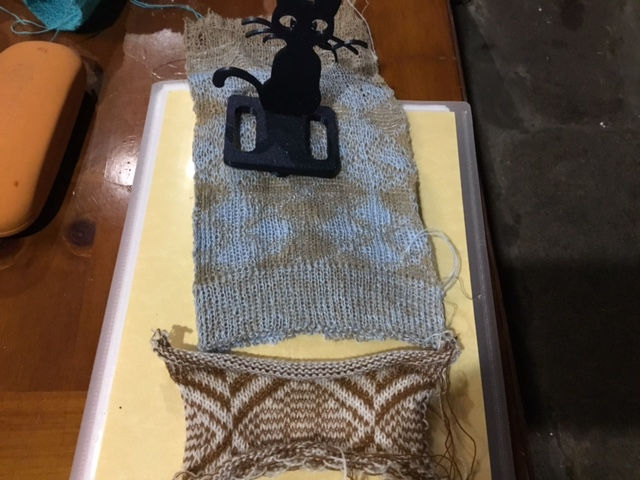
Once I got used to the format it only took seconds to take a look at the offered stitch patterns and to alter them was so easy, it even centred a stitch pattern in the middle of my selected stitches – just using the pattern width – seriously a good option for say baby blankets. It did this because I forgot to hightlight the amount of stitches I set up, so it just centred the exact width of the actual pattern within my amount of stitches. I offers so many options then shows you the results. Love this package and if you own a Superba that accommodates this and of course you can afford it then do not hesitate.
Many folk have upgraded their machines and installed it so it must be easy enough for some, and lets face it, I did it successfully eventually, but that is me, I rarely let anything beat me and if I had a serious problem and could not solve it via the web then I simply would have requested the help of the company I bought it off. It will definitely suit those whose machines are up all the time, as moving them could upset the hardware and I definitely would not like to be connecting and reconnecting all those pin connectors as they are so fragile.


How did you do the pintuck stitch pattern in the end? I used to work in a knitware shop back in the early 90’s and one of the most popular pieces was a pintuck cardigan. All models were made on e6000’s. I just love the texture and would really to recreate it.
Very interesting, thank you. Might you post an installation tutorial someday, as you didn’t find one online?